Pages

Highlight Of Last Week

Search This Website

Monday, 28 August 2017

Mx Player Par Kisi Bhi Video Ko Hide Kaise Kare

Mx Player Par Kisi Bhi Video Ko Hide Kaise Kare


Hello, Friends aajke is post main ham sikhenge ki MX Player par kisi bhi video ko hide kaise karte hai. Dosto aagar aap android mobile istemal karte ho to aap mx player ke naam jarur sune ho aur video dekhne ke liye sayed isi media player ko use bhi karte ho. MX player aabhi google play par sabse use kiya gaya mobile media player hai aagar aap aabhi tak isko use nahi kiya to aabhi install kare aur isko use karna start kare.
Aagar aapke mobile par bahut sare video hai aur usme se kuch video personal hai aur aap chahate ho uss video ko mx player par hide karke rakho ge to aap aajke is video ko follow karke kisi video ko mx player par hide karke rakh sakte ho. To dosto chaliye suru karte hai.

mx-player-tips


Mx Player Par Kisi Bhi Video Ko Hide Kaise Kare ?

Step 1. Pehle aap MX Player ko open kare aagar aapke pass max player nahi hai to aap google pay par jakar mx player likh kar search kare aapko mil jayega just install kare.

Step 2. Install karne ke bad aap mx plaer par jis video ko hide karna chahate hai us video ko thodi der ke liye pree kare dekhiye niche aapko Ek edit icon milega uspar click kare.

mx-player-tips

Step 3. Aabhi aapko Rename karna hoga kuch bhi change nahi karna hoga just aap Video naam ke age . dot add kare uske bad OK par click kare aapke video hide ho jayega.

mx-player-tips

Step 4. Bas aapke video MX player par hide ho jayega aabhi aagar aapko video firse dekhni hai to aap upar settings icon par click kare uske bad Settings par click kare uske bad List par click kare uske bad niche dekhe "Show hidden files and folders" option hai us option ko select kare aapko hide file firse dikh jayega.
mx-player-tips

To Friends main ummid karta hu aapko ye post jarur pasand ayega aur aapke kaam bhi ayega, aagar koibhi sawal hai to niche comment kare main aapki jarur help karne ki koi sis karunga, post se aagar help milta hai to niche se share button par click karke post ko share kare.

Post Aagar Accha Laga hai To Please Share Kare...
Read More »

OTG Cable Kya Hai - USB OTG Cable Kar Sakti Hai Ye 10 Kam

OTG Cable Kya Hai - USB OTG Cable Kar Sakti Hai Ye 10 Kam

Friends aajke is post me main aap logo ke sath share karunga OTG Cable kya hai OTG ka kam kya hai is bareme. Aagar aap Android mobile use karte hai to aapko sayed is OTG Cable ke bareme pata hoga, aagar nahi pata hai to koi bat nahi aajke is post ko padkar aap is OTG kya hai iska kam kya hai sab kuch jan sakoge. Dosto technology aabhi bahut age nikal gaya hai jo aap soch bhi nahi sakte aaj technology me wo kam ho raha hai. Jaise ki kuch saal pehle aagar kuch bhi karna padta tha to computer ki jarurat hota tha lekin aaj computer me jo kuch hota hai lagbag wo sabhi kam mobile me bhi ho jata hai. Jobhi ho aajka jo topic hai OTG chaliye uske bareme jante hai.
OTG-cable-kya-hai-hindi

OTG Cable Kya Hai ?
OTG ka Full Meaning hai "On The Go", Asan bhasa me jaise Computer ko USB host banakar jaise Computer par har traha ke flash drive [Hard Disk, Pen Drive, Card Reader, Modem etc] use kiya jata hai, thik usi traha Android mobile phone me bhi USB OTG Cable ke madad se flash drive connect kiya jata hai. 
Aabhi jadatar Android mobile phone me OTG support karti hai aur jo kam aap computer me karte the aabhi wo kam OTG ke madad se mobile se kar sakoge. Exam: jaise ki aapke aagar computer nahi haai but aap chahte hai mobile se aapne camera ko connect karenge auto copy karenge to aap USB OTG Cable ke madad se ye kam aap bahuti easy tarike kar sakte ho. Yehi tha otg ummid karta hu aapko samaj a gaya ki otg kya hai. 
OTG Cable Kaise User Kare Iska Price Kitna Hai ?
Friends aagar aapko nahi pata otg ko kaise use karte hai aur iska price kitna hai to dosto main aapko bata du ki isko use karna bahuti easy hai just aap Market se ya Online se ek OTG cable karid le price lagbhag 100Rs ke under aapko mil jayega, just Cable ki ek hisse ko mobile par connect kare dusre hisse par us USB ko connect kare jiske sath aap mobile ko connect karna chahate hai. 
otg-kya-hai
USB OTG Cable Kar Sakti Hai Ye 10 Kam ?

Dosto upar main aap logo ko bata diya hai OTG cabel kya hai iska kam kya hai isko use kaise karte hai, aabhi ham janenge kya hai wo 10 kam jo USB OTG Cable kar sakta hai, jo sayed aapko nahi pata hai.

1. Ek Android Phone Ko Dusre Android Phone Se Charge Kar Sakte Ho :

Aagar aapke pass aisa 2 phone hai jo OTG support karti ho to aap is cable ke madad se asani se ek phone se dusre phone par charge kar sakte ho.

2. Android Mobile Se Portable Hard Disk Ko Connect : 

Ha dosto aagar aapke phone ya internal memory bahut kam hai to aap is cable ke madad se kisi bhi Portable Hard Drive ko connect karke use kar sakte ho jaise aap kisi bhi pendrive ko bhi use kar sakte ho. 

3. Game Controller Ko Mobile Se Connect : 

Aagar aapko game khelna pasand hai to aap jo Game Controller computer me use karte the usko usko aap is cable ke madad se mobile me bhi use kar sakte ho aur ye bhuti easy tarike se. 

4. USB Light Ke sath Connect : 

Aagar aapke pass koi USB Light hai jo aap computer ya laptop par uske karne ke liye kharida tha to aap usko is cable ke madad se aap android mobile par bhi use kar sakte ho. 

5. LAN cable Connect : 

LAN cable bahuti kam ka hai aagar aapko kisi bhi LAN network use kari ho to aapko computer ya laptop par hi karna hoga lekin aabhi aisa nahi aagar aapke pas koi LAN cable OTG hai to aap iske madad se asani se LAN cable ko aapne phone bhi use karke net use kar sakoge. 

6. Ek phone se dusre phone me Contacts, Messages Send : 

Aagar aap chahte hai aapne kisi ek phone ke Contacts, Messages ko aap aapne dusre phone me transfer karoge to aap ye bilkul kar sakte ho uske liye aapko alag type ke OTG cable use karna hoga. 

7. Keyboard and Mouse Ko Connect : 

Aagar aap computer ki traha keyboard aur mouse ko aapne phone me use karna chahate ho to aap is cable ke madad se kar sakte ho is type ke cable ke price 80-90rs hota hai. 

8. Camera Ko Connect : 

Ha dosto aagar aapke pas computer nahi ek mobile phone hai to aap phone ko camera ke sat connect karke photo transfer kar sakte ho bahuti easy hai. 

9. Print Saved Documents : 

Aagar aapke phone me koi Saved Documents jaise ki PDF file, Word file hai to aap usko print kar sakte ho is cable ke madad se iske liye computer ki jarurat nahi hogi. 

10. USB Fan Connect : 

Ha dosto aagar aap chahate hai ek usb fan kharido ke aur computer se usko connect karoge to aap us usb fan ko sirf computer nahi mobile se bhi connect kar sakte ho aur use bhi kar sakte ho uske liye aapko usb fan and otg dono karid na hoga jo online par aapko mil jayega. 

To Dosto upar main bata diya hai Ki OTG Cable kya hai iska kam kya hai kaise use karte hai sab kuch aur iska kuch top use bhi main bata diya hai aagar aapko lagta hai aap is post se thoda bahut jankari hasil ki hai to comment kare post ko aapne dosto ke sath jarur share kare.

Post Aagar Accha Laga hai To Please Share Kare...
Read More »

Computer Ke Jaise Android Mobile Par Recycle Bin Kaise Use Kare

Computer Ke Jaise Android Mobile Par Recycle Bin Kaise Use Kare


Hello Friends aajke is post me main aap logo ke sath share karunga ki aap aapne Android mobile phone me Computer ke jaise ek Recycle Bin kaise add karoge Deleted files ko jama karne ke liye. Aagar aap computer use karte ho to aapko jarur pata hai ki Recycle Bin kya hai iska kam kya hai, aagar aapke computer nahi hai to sayed aapko pata nahi hoga Recycle Bin kya hota hai. Friends to aagar aapko Recycle Bin ke bareme kuch bhi nahi pata hai to main bata deta hu, Recycle Bin ka kam hai aap jab koi file ko apane computer se delete karoge to wo delete nahi hoga wo Recycle Bin par jakar jama hoga, iska bahut fayda hai aap aagar galti se koi file delete kar dete ho to us file ko asani se wapas la sakte ho Recycle Bin se.

Friends usi traha aagar aapko aapne mobile phone me bhi ek Recycle Bin chahiye to aap jarur add kar sakte ho, uske liye aapko ek App use karna hoga jiska nam hai "Dumpster" aap is app ke madad se aapne mobile phone me pc ki traha ek Recycle Bin add kar sakte ho jis me sare deleted Photo, video jama hoga jo aap chahe to bad me wapas kar sakoge. To friends aagar aap isko use karne me interested hai to niche ki step ko follow kare.
mobile-ko-tecycle-bin-kaise-banaye-hindi


Dumpster Kya Hai Isko Mobile Recycle Bin Kaise Banaye ?

Friends main pehle hi bata chuka hu ki aapko ek app install karna hoga, jiska name hai Dumpster, to aap niche se is app ko download kare uske bad install kare.


Step 1. Upar se app ko download karke install karne ke bad just open kare, oprn karne ke bad jo opiton ayega aap usme se "Skep Into" par click kare. Uske bad jo opiton ayega usme se "Delete It" par click kare, uske bad "Next" par click kare, uske bad "Done" par click kare, uske bad "continue" par click kare. Niche screen shot check kare 5 photo de diya hai aap usi ko follow kare.

mobile-ko-tecycle-bin-kaise-banaye


Step 2. Friends lagbhag aapke kam ho gaya hai, aabhi check karna hai ki ye thik traha se kam kar raha hai ya nahi, iske liye aap aapne Phone memory yafir "Gallery" par jaye uske bad koibhi ek photo ya video delete kare. Delete karne ke bad aap Dumpster app ko open kare dekhiye aapne jo photo , video delete kiya tha wo aapko mil jayega.

Step 2. Aabhi sawal hai delete karne ke bad Dumpster par photo video to ata hai but is app se dobara mobile me photo video ko wapas recovery kaise kare. Friends ye bahuti easy hai aap sirf Dumpster app ko open kare uske bad jis photo ya video ko recover ya wapas karna chahate ho usko open kare uske bad dekhiye aapko "Restore" button milega us par click kare.

mobile-ko-tecycle-bin-kaise-banaye


Friends main ummid karta hu ki aapko ye app bahuti accha laga hai aagar aapko lagta hai ye app aapke kam ka hai to isko phone me install rakhe aapka hi fayda hai, koibhi sawal hai to comment kare, post helpful laga hai to post ko share kare aapne dosto ke sath.

Post Aagar Accha Laga hai To Please Share Kare...                           
Read More »

Android Mobile Se Aabhi Uninstall Kare Ye Popular 7 Apps

Android Mobile Se Aabhi Uninstall Kare Ye Popular 7 Apps

Hello Friends aajke is post me main aap logo ke sath bahuti jaruri ek jankari dena wala hu, aajke ye post android mobile related hai aagar aap android mobile phone use karte ho to aap is post ko jarur full read kare isse aapko hi fayda hoga. Aabhi world ke popular mobile operating system me se sabse adhik popular hai Android. Khas karke india me har ek insan ke pas aagar mobile phone hai to usme se jadatar android phone hi hai. Android phone itna popular hone ke sabse badi bajha hai free apps aur easy to use, ha dosto android mobile ko use karna bahuti easy hai aur har koi isko use kar leta hai aur andrid ke liye free me bahut jada apps mil jata hai jo others kisi bhi OS me nahi milta hai.

Android mobile jo log use karte hai unme se sabhi log google play se hi apps install karte hai kyuki google play par sabhi apps free me mil jata hai aur ye android ka khud ka app store hai. Lekin ham ko google play se jitna apps install karte hai sabhi aap accha nahi hota hai inme se kuch apps aisa hai jo bahut popular hai but aapke mobile ke liye bahuti risky ho sakta hai. To aaj main kuch aisa hi kuch apps ke list banaya hai jo aapko use nahi karna chahiye aur aagar aap use karte ho to aabhi usko uninstall karna chahiye.
uinstall-kare-ye-apps

Android Mobile Se Uninstall Kare Ye Popular 7 Apps

Friends niche main jo top popular 7 android apps ke bareme batane wala hu aap aagar inme se ekbhi app aapne phone me use karte ho to aabhi us app ko remove kar do, kyuki ye jo app ke bareme main niche bataya hu wo aapke phone ko hack kar sakta hai, phone ko slow kar sakta hai aapke phone privacy ko out bhi kar sakta hai. 

1. Any Antivirus :
Friends aagar aap aapne mobile phone me koibhi antivirus use karte ho to main aapko bolunga ki aap aabhi us antivirus ko aapne phone se uninstall kare, kyuki aagar aap google play se apps install karte hai aur aap aapne phone ko root nahi kiya hai to aapke phone me antivirus ki koi jarurat nahi hai. Lekin aagar aap google play ke bahar dusre websites se apps install karte ho aapne phone ko root kiya ho to wo alag bat hai. but aagar aap sirf google play se hi apps install karte ho to antivirus ki 1% bhi jarurat nahi hoga. Main khud aapne computer par antivirus use karta hu but mobile par aabhi tak koibhi antivirus use nahi kiya.

any-antivirus

2. Clean Master :
Clean Master aagar aap google play par is app ko search karoge to aap samaj jawoge ki ye app kitna popular hai aabhi tak is appko 600 milion use ne use kiya hai. Lekin dosto mujhe aabhi tak ye baat samaj nahi ata ki log is app ko ista use kyu karta hai. is app ka itna popular hone ke karan is app par battery saver, ram optimizer, mobile booster etc hai aur jadatar log soch te hai is app ko use karne se phone ka speed fast hoga, but ye soch galat hai kyuki ye app bilkul fake hai koi kam ka nahi. aagar aapko lagta hai aapke mobile fast clean rakhna hai to aabhi android par hi default system hai jo auto ye sab kam kar deta hai. isi liye aagar aap is Clean Master ko aapne phone me install kiya ho to aabhi uninstall kare aur kuch din mobile ko use karke dekhe aapko koi farak nahi padega.

clean%2Bmaster

3. DU Battery Saver & Fast Charge :
DU Battery Saver iska user aagar aap google play par dekho go to aap hairan ho jawoge kyuki aabhi tak isko 100,000,000 - 500,000,000 itna user ne aapne phone me install kiya hai but sach bat ye hai ki ye app kisi bhi kam ka nahi hai totally fake app hai. kyuki aagar aapke phone me pahle se fast charge feature nahi hai to ye aap aapko kabhi bahi fast charge karne me madad nahi karega. aagar aap isko use karte hai aapne mobile me to aabhi isko uninstall kare.

du-battery-saver
4. CLEANit :
CLEANit yebhi bahuti popular ek app hai aur google play par iska bhi use bahuti jada hai aur rating bhi 4.6 hai. lekin dukh ki bat ye app bhi kisi kam ka nahi, ye app popular hai mobile junk file cleaner ke hisab se. but aap aagar is app ko use karte ho to aapke mobile fast to hoga hi nahi ulta aapka phone pahle se slow ho jayega. jadatar log soch se tai ram cache clean karne se phone ka speed bad jata hai lekin aap galat soch te hai isse aapke mobile slow ho jata hai. aagar aap is app ko use karte ho to aabhi uninstall karo.

CLEANit

5. UC Browser :
World ke kuch popuar mobile web browser me se uc browser ek hai. har ek android mobile user is app ko aapne mobile phone par use karta hai. but kya aapko pata hai ye browser aapke liye kitna risky hai, haa is app ka kuch features accha hai jaise iska download speed, ads block features but baki kuch aisa bad features hai jo aapke liye bahuti risky hai. aagar aap uc browser use karte ho to aapke phone se boring type ka adult ads notification ayega aap aagar nahi chahoge phirbhi ayega ye ek bahuti buri bat hai aur ye browser app aapke mobile ke IMEI, WIFI MAC, etc aapke permission ke bina out kar deta hai jo aapke liye bahuti risky hai. to aap is browser use na karke google chrome, mozila browser ko use kare.

uc-browser

6. ES File Explorer (Free Verison) :

Friends sayed aap jante ho ki ye kitna popular ek file explorer app hai, aabhi tak ye app google play se milion user hoya hai aur iska rating bhi bahuti accha hai. mujhe khud ye aap bahuti jada pasand hai kyuki iss aap par bahut powaer full features hai. but problem hai iss app ka free verison me aagar aap free verison use karte ho to bahut jada ads show karta hai aur aapko popup ads ke madad se trha trha ke apps install karne ko bolta hai aur bad features hai iska free verison me aur wo hai ye aap aapke permission ke bina bloatware and ad-ware install kar deta hai.

es-file
7. Dolphin Web Browser :
Google play par bahut popular ek mobile browser hai, isko aabhi tak 150 milion user ne install kiya hai. is browser me aapko bahut badiya features milta hai jaise ki ad-free, Flash-supporting, HTML 5 video ye sab support karta hai jiske wajha se ye itna popular hai. but iska problem bhi UC browser ki traha hi hai aapka privacy out kar deta hai aur aap is browser se jo kuch search karte ho wo sab save karke rakhte hai aur mujhe lagta hai ye aapke liye bahut risky ho sakta hai. aagar aap is ko use karte ho to aabhi uninstall kare aur dusra koibhi google chrome, mozila browser use kare.

Dolphin%2BWeb%2BBrowser

Friends upar me world ke top kuch android ke bareme bataya hu jo bahut popular hai but aapke liye bahut risky hai aur aapke mobile ke liye koibhi kam ka nahi. aagar aap upar ke koibhi app aapne phone me use karte ho to aap uninstall kare. aagar aapko lagta hai me galat hu aap sahi ho to aap is app ko use kar sakte ho wo aapke marji, but use na karna accha hai baki aapke upar. aagar aapko post helpful laga hai to post ko share kare.
Post Aagar Accha Laga hai To Please Share Kare...                                   
Read More »

Sunday, 27 August 2017

Top 5 Best Free 3D Live Wallpaper Android Mobile Ke Liye

Top 5 Best Free 3D Live Wallpaper Android Mobile Ke Liye

Top 5 free live wallpaper! kya aap android mobile phone use ho? aagar aap android mobile istemal karte ho to aapke mobile par aap 3D live wallpaper use karke aapne phone look ko behetar bana sakte ho. Live wallpaper bahur majedar hota hai dikhneme aagar aap new android mobile use ho to sayed aapko live wallpaper ke bareme nahi pata lekin aagar aap bahut din se android use karte ho to aapko live wallpaper kya hai iska kam kya hai aapko sab pata hoga. Live wallpaper normal wallpaper ki traha nahi hota hai ye bilkul alag traha ke hota hai, jaise ki aagar aap kisi Tiger ke live wallpaper aapne phone screen me set kiya to aapko lagega aapke mobile screen par ek jinda Tiger chal raha hai. dosto jobhi ho niche main kuch top and best live wallpaper share kiya hai sayed aapko logo ko accha lagega.
top-5-best-android-live-wallpaper

Top 5 Android Free Live Wallpaper 

1. 3D Wallpaper Parallax :
Aagar aapko 3D effect chahiye to aapke liye 3D Wallpaper Parallax ye bilkul perfect hai, kyuki is app ke under aapko bahut sare live wallpaper mil jayega jo sabhi 3D effect se bani hai, is live wallpaper ke under aapko Spiderman, Deadpool, Tiger, IronMan etc har traha ke live wallpaper mil jayega ek app ke under, agar aap is 3D live wallpaper ko use karna chahate ho to niche se install kare.

live-wallpaper-3d
Google-Play-se-install-kare

2. Roses Live Wallpaper :
Aagar aapko rose pasand hai to aapke liye ye live wallaper best hoga, kyuki ye roses live wallpaper dikhne me bilkul lagega aapke phone screen par kuch rose hai aur aap usko tuch bhi kar sakoge aisa feelings ayega, isme 3d effect bhi hai isi liye aapko isme 3d ki traha bhi dikhno ko milega, aagar aap isko use karna chahate ho to niche se free me install kar sakte ho.

roses-live-wallpaper

Google-Play-se-install-kare

3. 3D Blossoms Live Wallpaper :
Aagar aapko ek best live wallaper chahiye to aapke liye ye 3D Blossoms Live Wallpaper best hai, isko aapne screen par set karne ke bad aapko yekin nahi hoga kitna khud surat hai ye blossoms live wallpaper, ye bilkul free hai aagar aapko ye chahiye to niche se install karke use kare 100% aapko accha lagega.

3D%2BBlossoms%2BLive%2BWallpaper

Google-Play-se-install-kare

4. Sun Rise Free Live Wallpaper :
Sun Rise Free Live Wallpaper ye bahuti simple ek live wallpaper hai, isko banaya hai Teragon ne, aur iska jo effect hai wo dekhne layek hai, aapko aapko is wallpaper ke under hat rhake effect dikha ga, aap ekbar isko use karke dekhiye aapko 100% pasand ayega. aagar install karni hai to niche se install kare.

sun-live-wallpaper

Google-Play-se-install-kare
5. Real Butterflies on Screen :
Butterflies har kisi ko pasand hai aagar aapko bhi Butterflies accha lagta hai to aap aabhi aapne mobile screen par Butterflies live wallpaper use kar sakte ho, aaj main jo Butterflies wallpaper aapke sath share karunga usko dekha kar lagega bilkul Butterflies aapke mobile ke upar hai, to aagar aapko Butterflies live wallaper chahiye to niche se install kare.

Butterflies-live-wallpaper

Google-Play-se-install-kare


Friends aaj main sirf 5 best and top Live Wallpaper aap logo ke sath share kiya hai, mujhe jo jo accha lagta hai main wosab aap logo ke sath share kiya hai, ummid karta hu aapko bhi pasand ayega, upar jo 5 live wallpaper hai unmese sabse best mujhe lagta hai wo hai 3D Wallpaper Parallax ye best hai aap isko jarur use kare. aajke liye itna hi aagar post helpful laga hai to post ko share jarur kare.
Read More »

Khud Ke Awaz Se DJ Rap Music Songs Kaise Banaye

Khud Ke Awaz Se DJ Rap Music Songs Kaise Banaye

Hello Friends aajke ye post bahuti interesting hai, aajke is post me main aap logo ke sath share karunga ki Aapne khudke awaz se rap music audio kaise banate hai. Aagar aapko gaana gane ki sokh hai to aap aajke is post ko follow karke khudke RAP Music bana sakoge just kuch hi click me wobhi aapne android mobile phone se. Indino me rap bahuti popular ek music style hai aabhi har ek bollywood movie me rap songs hota hai. Aagar aap soche te hai aapke awaz thik nahi hai aapke awaz ke rap accha nahi lage ga to dosto aisa kuch bhi nahi hai aaj jo app me aap logo ke sath share karunga is app ko use karke aapke awaz kitna bhi bura kyu na ho wo badiya rap music ban jayega sure. Jo log android mobile use karte hai wohi is post ko follow kare jo log pc use karte hai unke liye ye post nahi hai. To dosto RAP music ke liye aaj ham jo App ki use karenge uska naam hai AutoRap ye bahuti popular ek app hai google play ke under. Jobhi ho aagar aap sach me rap music banani hai to aap is post ko follow read kare.
rap%2Bmusic%2Bkaise%2Bbanaye%2Bhindi%2Bme

Aapne Awaz Ke Rap Music Audio Kaise Banaye ?
Step 1. Pahle aap niche se AutoRap app ko install kare ye bilkul free app hai, app install karne ke bad aapko just appko open karna hai to aap open kare.


Step 2. App ko install karke open karne ke bad aap dekhiye aapko app ke under bahut sare music dikh raha hai, pahle jo 2 music hai wo free hai aap wo do music ko use karke aapne rap music bana sakoge, baki jo music hai wo paid hai usko use karne ke liye aapko buy karna hoga. Lekin ekdon niche dekhiye aapko ek opiton dikhega "UNLOCK ALL SONGS" us par click karke aap aur 10 songs use kar sakte hai free me, lekin uske bad aapko kuch app install karne padega tab jake aapko free aur 10 songs milega. Jobhi ho aap jis songs ko select karna chahate hai us song par click kare uske bad "SELETE" par click kare.


rap%2Bmusic%2Bkaise%2Bbanaye

Step 3. Aabhi aapke same 2 opiton ayega aap unme se "TALK" par click kare.

rap%2Bmusic%2Bkaise%2Bbanaye

Step 4. Aabhi aap niche Red Record icon par click kare, uske bad aap aapna gana start kare, yani ki aapko aabhi voice record karna hoga jo voice aap rap music me dena chahate hai wo voice record kare. Record hone ke bad aapko phir se usi red record button par click karna hoga aur record stop karna hoga.

rap%2Bmusic%2Bkaise%2Bbanaye%2Bhindi%2Bme


Step 5. Aabhi aapke Rap music ban jayega aap just play karke check kare aapke rap music aapke khudke awaz par kaisa lag raha hai, aagar sab thik tak hai to aap just "SOLO" button par click kare.

rap%2Bmusic%2Bkaise%2Bbanaye%2Bhindi%2Bme

Step 6. Upar solo par click karne ke bad aapke samne aur ek opiton ayega jisme aapko do opiton dikhega 1. Share aur 2. DONE to aap aagar whatsapp, facebook par aapne rap music ko share karna chahate hai to share par click karke wo kar sakte hai, lekin aagar aapko mobile par save kari ho to aap DONE par click karke save kare.

rap%2Bmusic%2Bkaise%2Bbanaye%2Bhindi%2Bme

Freidns main ummid karta hu ki aapko ye post accha laga hai, aur main pahle hi bata diya hai ye bollywood singers ki traha nahi hoga just aap aapne awaz ke rap music bana ke dosto ko chamka sakte ho, aagar aapko ye post helpful laga hai post se aapko maja aya hai to please post ko share kare, koibhi sawal aagar karni hai to comment kare.
Read More »

Saturday, 26 August 2017

Internet Ke Bina Google translate Kaise Use Kare

Internet Ke Bina Google translate Kaise Use Kare

Google translate wo bhi bina internet ke ? Han dosto ye mumkin hai. Aagar aap android mobile istemal karte hai to aap bina internet ke google translate ko use kar sakte hai. Google translate kya hai! sayed aapko pata hai, translate ke matlab aap kisi bhi bhasa ko aapne bhasa par badal sakte ho. Sochiye aap kisi english word ko Hindi me translate karna chahate ho to aap is google translate ko use karke asani se jan sakte ho.
Google translate ko bina internet ke istemal karne ke liye aapko jarur mobile use karna hoga, kyuki computer se ya kam nahi hoga. aagar aapke pas android mobile hai to aap ye kam kar sakoge aagar nahi hai to sorry.
google%2Btranslate%2Bbina%2Binternet%2Bke%2Bkaise%2Bchalate%2Bhai

Bina Internet Ke Google translate ko kaise use kare ?


Step 1. Pahle aap play.google.com  is link par jakar google translate app ko aapne mobile par install kare, agar pahle se hai to aapko dobara install karne ki jarurat nahi hai.

Step 2. Install karne ke bad aap App ko open kare, open karne ke bad aap agar English to Hindi me translate karna chahate ho to us hisab se select kare or aagar Hindi to English translate karna chahate ho to us hisab se select kare. select karte samaye dekhe ek download button hai uspar click kare.

google%2Btranslate%2Bbina%2Binternet%2Bke

Step 3. Aap jis bhasa ko bina internet ke translate karna chahate ho usko isi traha download kare size 20-30 MB tak hoga. Upar download icon par click karne ke bad aap niche ki traha Download par click kare.

Screenshot_2016-09-09-19-53-44

Step 4. Upar photo par dekhe likha hai Offline translation iske matlab asb aap bina internet ke bhi translate kar sakoge.

Step 5. Download hone ke bad aap aapne internet disconnect kare uske bad abhi jis bhasa ko download kiya usko translate karke dekhe.

Step 6. Niche dekhe main English to Hindi translate kiya bina internet ke.

bina%2Binternet%2Bke%2Bgoogle%2Btranslate

Dosto sayed aapne samaj gaya ho ki kaise Internet ke bina google translate karte hai, aagar aapko koi bhi problem ho to niche comment karke bataye. Post aagar accha laga to jarur dosto ke sath share kare, niche comment karke bataye kaisa laga. aajke liye itna hi jald milte hai kuch naya topic ke sath tab tak ke liye bye.
Read More »

Mobile Se Youtube Video Dekhne Ke Sath Dusra Kaam Bhi Kare

Mobile Se Youtube Video Dekhne Ke Sath Dusra Kaam Bhi Kare

Youtube new tricks, youtube video player! hello friends aajke is post me main aap logo ke sath youtube ke bahuti majedar ek app share karunga, aap ka nam hai floating youtube app. aagar aap android mobile se youtube video, movies, songs dekhna pasand karte hai to aajke is post ko follow karne se aapko bahut fayda hoga. Aajb aap youtube app se koi video dekhte ho to aap aapne mobile par aur koi dusra kam nahi kar pate, kyuki youtube app se video dekhna hai to aapko sirf youtube video hi dekhna hoga aap aapne mobile par aur koi bhi kam nahi kar pawoge, lekin aajke is post ko follow karke aap youtube video ko dekhne ke sath sath koibhi kam kar sakoge, jaise aagar aap youtube video ke sath sath facebook, whatsapp message karna chahate ho to aap kar sakoge koibhi kam aap kar sakoge. ye jo tips hai isko picture in picture feature bolte hai ya youtube floating feature bhi kaha jata hai. to chaliye dekhte hai is app ko use kaise karte hai.

youtube-floating-app

Youtube Floating App Kaise Use Kare ?

Step 1. Pahle aap Google play se Youtube Floating app ko aapne mobile par install kare, niche link de diya hai usi ko install kare.

Step 2. Install karne ke bad aap aapp ko open kare, open karne ke bad aap koibhi ek video ko play kare.
Step 3. Video ko play karne ke bad aap aapne app ko close kare ya exit kare, app ko close karne ke bad bhi dekhiye video play hota rahega. aabhi aap youtube play hone ke sath sath koibhi kam kar sakoge, jaise facebook, whatsapp koibhi kam.

youtube-tips-hindi

Friends aap upar jo photo hai usko dkehiye aapko samaj a jayega, aap isi traha kisi bhi youtube video ko dekhne ke sath sath mobile par kisi bhi dusre kam ko kar sakte ho. Main ummid karta hu ki aapko ye post helpful laga hai aagar aapko ye post accha laga hai to please post ko share kare.
Read More »

Friday, 25 August 2017

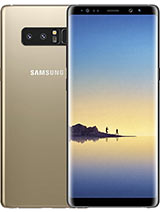
Samsung Galaxy Note8 : samsung note 8 launch date in india


Samsung Galaxy Note8
6GB RAM
Exynos 8895 Octa

3300mAh
Li-Ion


When is Galaxy Note 8 coming to India?

Again, there is no official confirmation from Samsung about the Galaxy Note 8 India launch, but we expect the Note 8 India roll out to commence in the first or second week of September. We are keeping a close check with the Samsung team in India, we'll be adding more updates about the Galaxy Note 8's price and India launch.

Samsung Galaxy Note 8 smartphone was launched in August 2017. The phone comes with a 6.30-inch touchscreen display with a resolution of 1440 pixels by 2960 pixels.

The Samsung Galaxy Note 8 is powered by 1.6GHz octa-core Qualcomm Snapdragon 835 processor and it comes with 6GB of RAM. The phone packs 64GB of internal storage that can be expanded up to 256GB via a microSD card. As far as the cameras are concerned, the Samsung Galaxy Note 8 packs a 12-megapixel primary camera on the rear and a 8-megapixel front shooter for selfies.

The Samsung Galaxy Note 8 runs Android 7.1.1 and is powered by a 3300mAh non removable battery. It measures 162.50 x 74.80 x 8.60 (height x width x thickness) and weigh 195.00 grams.

The Samsung Galaxy Note 8 is a single SIM (GSM) smartphone that accepts a Nano-SIM. Connectivity options include Wi-Fi, GPS, Bluetooth, NFC, USB OTG, Headphones, 3G and 4G (with support for Band 40 used by some LTE networks in India). Sensors on the phone include Compass Magnetometer, Proximity sensor, Accelerometer, Ambient light sensor, Gyroscope and Barometer.
Samsung Galaxy Note 8 detailed specifications
=
GENERAL
Release date Aug-17
Form factor Touchscreen
Dimensions (mm) 162.50 x 74.80 x 8.60
Weight (g) 195
Battery capacity (mAh) 3300
Removable battery No
Colours Midnight Black, Orchid Gray, Maple Gold, and Deep Sea Blue
SAR value NA
DISPLAY
Screen size (inches) 6.3
Touchscreen Yes
Resolution 1440x2960 pixels
HARDWARE
Processor 1.6GHz octa-core
Processor make Qualcomm Snapdragon 835
RAM 6GB
Internal storage 64GB
Expandable storage Yes
Expandable storage type microSD
Expandable storage up to (GB) 256
CAMERA
Rear camera 12-megapixel
Flash Yes
Front camera 8-megapixel
SOFTWARE
Operating System Android 7.1.1
CONNECTIVITY
Wi-Fi Yes
Wi-Fi standards supported 802.11 a/b/g/n/ac
GPS Yes
Bluetooth Yes, v 5.00
NFC Yes
Infrared No
USB OTG Yes
Headphones Yes
FM No
Number of SIMs 1
SIM 1
SIM Type Nano-SIM
GSM/CDMA GSM
3G Yes
4G/ LTE Yes
Supports 4G in India (Band 40) Yes
SENSORS
Compass/ Magnetometer Yes
Proximity sensor Yes
Accelerometer Yes
Ambient light sensor Yes
Gyroscope Yes
Barometer Yes
Temperature sensor No
Read More »

Now call your friends from other number without changing Sim Card.

BINA SIM CARD CHANGE KIYE DOOSRE NUMBER SE CALL KAISE KAREN TRICKS IN HINDI

Now call your friends from other number without changing Sim Card. Bina Sim Card Change Kiye Doosre Number Se Call Kaise Karen Tricks In Hindi. Ajkal ke har mobile dual sim hote hai. Aise me hume kafi subidha ho jati hai. hum ek sim calling ke liye to ek Internet ke liye rakh lete hai. Magar kai baar aisa ho jata hai ki hume calling ke liye sim change karni pad jati hai. Aise me badi preshani hoti hai. Kon baar baar sim card nikale aur dale. Apki is samsya ka smadhan is post me milega. Aaiye jante hai kaise?


Bina Sim Card Change Kiye Doosre Number Se Call Kaise Karen
Aap ye baat jankar hairan rah jaoge ki bina sim card badle bhi aap doosre number se call kar sakte hai. Itna hi nahi call ke sath aap message bhi kar sakte hai. Aap soch rahe honge ki kaise. Ye zamana ab smartphones ka hai. Bina Sim Card badle doosre number se call hogi ek application se. Aur is application ka naam hai Text Me

Is Application ko aap Google play store me jakar download kar sakte hai. Ye application aap free me download kar sakte hain. Google play store ke alawa ye application Apple ke App Store me bhi apko bahut hi asaani se mil jayegi. Ab apko batate hai ki kaise Text Me se bina Sim Card change kiye doosre number se call kar sakte hai.

How to use Text Me App for calling without changing Sim Card
Bina Sim Card change kiye doosre number se call karna chahte hai to sabse pahle Google Play Store me jayen. Ab yaha par search box me Text Me type karen. Ab aap Text Me ko install kar lijiye. Install hone ke baad aap free me is application me account create kar lijiye. Agar aap ek se jyda number istemal karna chahte hai to fir apko monthly charge dena hoga. Monthly charge 60 rs hai. Agar ek hi number istemal karna chahte hai fir koi problem nahi hai.

Ab aap is application ki setting me jayen aur jis number se call aur messages karna chahte hai use set kar lijiye. Setting karne ke baad ap kisi ko bhi apna doosra number bataye bina call ya message kar sakte hai. Ab aap soch rahe honge ki akhir is application ki jarurat hi kyu padi. To chaliye ye bhi apko bata dete hai.
Darasal is application ko develop karne ke pichhe ki kahani ye ki Europe jaisi country me dual sim ka trend ab lagbhag khatm hota dikh raha hai. Jiske chalte ab TextMe name ki ye application logo ko bina sim badle doosre number se call or message karne ki subidha de rahi hai. Ho sakta hai ane wale time me Asia me bhi dual sim ka craze khatm ho jaye.


Apko ye post kaise lagi please comment me jarur bataye. Aise hi mazedar tricks aur tips ke liye visit karte rahiye www.wirelesstricks.com
Read More »